Jul 6, 2011

Which .NET version a running program is using?


I was asked a question by a colleague:
He has many .NET framework installed on machine. Once he has a program running on the system, what he knows is that program is a .NET developed program, and he would like to further identify which .NET version the program is using.

I didn't know the answer, but today I read 《CLR via C#》, I got the answer:

1, go to registry key
HKEY_LOCAL_MACHINE\SOFTWARE\Microsoft\NET Framework Setup\NDP
You will know what versions of .NET Framework is installed on the machine.
2, go to any .NET Framework SDK,

If you have Visual Studio installed on your computer: On the taskbar, click Start, click All Programs, click Visual Studio, click Visual Studio Tools, and then click Visual Studio Command Prompt.

-or-

If you have the Windows SDK installed on your computer: On the taskbar, click Start, click All Programs, click the folder for the Windows SDK, and then click Command Prompt (or CMD Shell).


for example in Visual Studio 2010 prompt, which might be
C:\Program Files\Microsoft Visual Studio 10.0\VC;
3, CLRVer.exe -all
This command can show which version of the CLR is being used by processes running ont he machine or you can pass the ID of the processs you are interested in.

Keep reading...

Jul 4, 2011

g2m3 Codec - Windows Media Player

Today I was trying to watch a WMV file, but it prompts an error: G2M3 codec is not installed on your desk. The WMV file is a meeting recording, and seems to be using G2M3 codec, which is a plugin for Windows Media Player. To solve this, download installer from http://championsriver.com/g2m_codec.exe, and install it.

Jun 9, 2011

Adobe Reader Keyboard Shortcuts


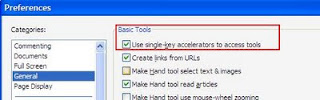
For a long time, I am struggling to find a way to switch between Hand Tool and Select Tool, today I happened to find a method about it:


This is called Adobe Reader Keyboard Shortcuts, to enable single-key shortcuts, in Adobe Reader or Adobe Acrobat, choose choose Edit > Preferences > General, and then select the Use Single-Key Accelerators To Access Tools option.


Now worlds are peace. To go to Hand Tool, press "H"; Select Tool, press "V".


May 19, 2011

The HP Way


We have trust and respect for individuals.

We approach each situation with the belief that people want to do a good job and will do so, given the proper tools and support. We attract highly capable, diverse, innovative people and recognize their efforts and contributions to the company. HP people contribute enthusiastically and share in the success that they make possible.

We focus on a high level of achievement and contribution.

Our customers expect HP products and services to be of the highest quality and to provide lasting value. To achieve this, all HP people, especially managers, must be leaders who generate enthusiasm and respond with extra effort to meet customer needs. Techniques and management practices which are effective today may be outdated in the future. For us to remain at the forefront in all our activities, people should always be looking for new and better ways to do their work.

We conduct our business with uncompromising integrity.

We expect HP people to be open and honest in their dealings to earn the trust and loyalty of others. People at every level are expected to adhere to the highest standards of business ethics and must understand that anything less is unacceptable. As a practical matter, ethical conduct cannot be assured by written HP policies and codes; it must be an integral part of the organization, a deeply ingrained tradition that is passed from one generation of employees to another.

We achieve our common objectives through teamwork.

We recognize that it is only through effective cooperation within and among organizations that we can achieve our goals. Our commitment is to work as a worldwide team to fulfill the expectations of our customers, shareholders and others who depend upon us. The benefits and obligations of doing business are shared among all HP people.

We encourage flexibility and innovation.

We create an inclusive work environment which supports the diversity of our people and stimulates innovation. We strive for overall objectives which are clearly stated and agreed upon, and allow people flexibility in working toward goals in ways that they help determine are best for the organization. HP people should personally accept responsibility and be encouraged to upgrade their skills and capabilities through ongoing training and development. This is especially important in a technical business where the rate of progress is rapid and where people are expected to adapt to change.

May 9, 2011

How to Set Auto Height of Row in Excel 2007


Ah, you may think this is a dummy question, and I agree it is. But it took me half an hour to figure out how to do it. Below is the method:
1, double click the left bar boundary of a row (Not a cell, but the row number in a row)
2, Select rows that you want your operations on, and then mutiple rows: you can choose Format--> AutoFit Row Height

PS: It really took me a long time to find out where the "Format" option locates.Haha!