Our company used McAfee but it's not able to be uninstalled.
The strategy is to use safe model, but by default windows installer service is not started in safe model. The ways to solve it:
A.
Safe Mode.
Type this in a command prompt:
REG ADD "HKLM\SYSTEM\CurrentControlSet\Control\SafeBoot\Minimal\MSIServer" /VE /T REG_SZ /F /D "Service"
and then
net start msiserver
This will start the Windows Installer Service.
Safe Mode with Network
REG ADD "HKLM\SYSTEM\CurrentControlSet\Control\SafeBoot\Network\MSIServer" /VE /T REG_SZ /F /D "Service"
and followed by
net start msiserver
B. stop service as possible as you can, disable all McAfee related services
C.
Step 1: Find where the FrmInst.exe file is located. Generally located in C:\program Files\McAfee\Common Framework
Step 2: Open command prompt.
Step 3: Run this command: C:\program Files\McAfee\Common Framework\frminst /forceuninstall
Sep 29, 2011

Aug 30, 2011
TortoiseSVN Trick - How to update your authentication information
 Today I changed my NT password as required by IT. When I use TortoiseSVN, it prompts wrong authentication error: Oh, I saved my name and password in SVN for a long time. That is the old NT password.
But how can I update it? I didn't find a place about updating... The answer is this: in TortoiseSVN,
go to Settings-->Saved Data. Clear Authentication data, then when you doing a commit, an authentication dialog will pop up for you to input the new values. This works!
Jul 6, 2011
Which .NET version a running program is using?

I was asked a question by a colleague:
He has many .NET framework installed on machine. Once he has a program running on the system, what he knows is that program is a .NET developed program, and he would like to further identify which .NET version the program is using.
I didn't know the answer, but today I read 《CLR via C#》, I got the answer:
1, go to registry key
HKEY_LOCAL_MACHINE\SOFTWARE\Microsoft\NET Framework Setup\NDP
You will know what versions of .NET Framework is installed on the machine.
2, go to any .NET Framework SDK,
If you have Visual Studio installed on your computer: On the taskbar, click Start, click All Programs, click Visual Studio, click Visual Studio Tools, and then click Visual Studio Command Prompt.
-or-
If you have the Windows SDK installed on your computer: On the taskbar, click Start, click All Programs, click the folder for the Windows SDK, and then click Command Prompt (or CMD Shell).
for example in Visual Studio 2010 prompt, which might be
If you have Visual Studio installed on your computer: On the taskbar, click Start, click All Programs, click Visual Studio, click Visual Studio Tools, and then click Visual Studio Command Prompt.
-or-
If you have the Windows SDK installed on your computer: On the taskbar, click Start, click All Programs, click the folder for the Windows SDK, and then click Command Prompt (or CMD Shell).
for example in Visual Studio 2010 prompt, which might be
C:\Program Files\Microsoft Visual Studio 10.0\VC;
3, CLRVer.exe -all
This command can show which version of the CLR is being used by processes running ont he machine or you can pass the ID of the processs you are interested in.
Keep reading...
Jul 4, 2011
g2m3 Codec - Windows Media Player
Today I was trying to watch a WMV file, but it prompts an error: G2M3 codec is not installed on your desk. The WMV file is a meeting recording, and seems to be using G2M3 codec, which is a plugin for Windows Media Player. To solve this, download installer from http://championsriver.com/g2m_codec.exe, and install it.
Jun 9, 2011
Adobe Reader Keyboard Shortcuts
For a long time, I am struggling to find a way to switch between Hand Tool and Select Tool, today I happened to find a method about it:

This is called Adobe Reader Keyboard Shortcuts, to enable single-key shortcuts, in Adobe Reader or Adobe Acrobat, choose choose Edit > Preferences > General, and then select the Use Single-Key Accelerators To Access Tools option.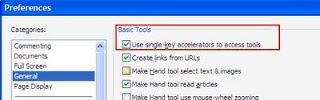
Now worlds are peace. To go to Hand Tool, press "H"; Select Tool, press "V".


For more information, please go to http://help.adobe.com/en_US/Acrobat/9.0/Standard/WS58a04a822e3e50102bd615109794195ff-7aed.w.html
Subscribe to:
Posts (Atom)