Sep 9, 2013

Good Email App for Pad: TouchDown HD

Our company's email account will force a security setting, which will compel you to use a screen lock with PIN or password etc. This is to say, every time the screen is turned on and off, you need to type the PIN to unlock it.


We understand that this is very important for company security, because the device may contain sensitive information. But it needs to frequently input the password, which is so inconvenient. How can we overcome it? Now we have found a tool that can both satisfy the security needs and avoid the inconvenience of typing the password.

The solution is to use a app called: TouchDown HD.

It contains calendar, email and contacts tabs, and it has powerful configuration settings.
And most importantly, when you configure the email account using TouchDown HD, it only locks itself. The device is not locked, so that you don't need to input password every time you turn on the device.


If you find this article is useful, please click the ads on this page to help. Thank you very much.



Download mp3 in embedded player - Using fiddler

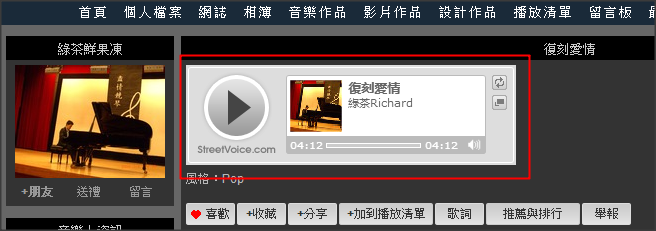
We all have experiences that  we open a webpage and have listened to a wonderful song, and we want to save it. But many times the song is played by a Flash player, or to say, it's embedded. Like the picture shown below:


How can find the source of the audio file and start to download it?

Here comes the solution - Fiddler
Fiddler is a great tool that helps you analyze web traffic, for more information you can refer to http://fiddler2.com/


1. I opened the webpage and start to analyze the web traffic
For example, the webpage is: http://tw.streetvoice.com/music/shin260/song/105109/


2. Through analysis on the web traffic,

I found that it's calling a api to play audio, and the JSON result is the songURL.

3. I put the song URL in browser and get a way to save the music.


OK, that's done.

I also would like to share the song and the lyric.
复刻爱情:
https://www.dropbox.com/s/jvehx88gd17gzt0/%E5%A4%8D%E5%88%BB%E7%88%B1%E6%83%85.mp3

Lyric:


Aug 21, 2013

[Solved] Jetty HTTP 500 "A full JDK (not just JRE) is required"

Today I am deploying Jetty in my machine, my machine configuration is:
OS: windows 7, JDK: jdk1.7.0_25, Jetty: Jetty9
And I have configured JAVA_HOME in system environment and also add %JAVA_HOME%\bin in Path

I can start Jetty:
Java -jar start.jar

And I can see in console it successfully started.
But when I try to access the web application via browser, I met a strange problem:

ERROR:
PWC6345: There is an error in invoking javac.  A full JDK (not just JRE) is required


SOLUTION:

1. Edit jetty.xml which is under the jetty installation folder \etc folder, for example C:\Program Files\jetty-distribution-9.0.5.v20130815\etc

2. Add a section

    org.apache.jasper.compiler.disablejsr199
    true


within section


It's a happy world now!
The solution was referring Jetty document: http://wiki.eclipse.org/Jetty/Howto/Configure_JSP

If you think this article is useful, please click the ads on this page to help. Thank you very much.

Aug 15, 2013

How to add code snippet in Google Blogger

This blog is interesting because it's a blog about Blogger itself. Google Blogger is powerful but it's not easy to use. As a developer, we often want to add some code snippet in our blog but it's not available in blogger. Fortunately there is a way to do it - The solution is to use:
SyntaxHighlighter (http://alexgorbatchev.com/SyntaxHighlighter/)


Step1: go to blogger dashboard -->Template--> Edit HTML

Step2: In the part, add the codes below to enable SyntaxHighlighter.


http://alexgorbatchev.com/SyntaxHighlighter/manual/brushes/


 -->-->


to add more language support, for example SQL, you can add the js below in the codes we added to head section:
  

3. In the blog you write, edit html, add the codes For example, below is what I put:


And when publish or preview the post, it looks great!


Bingo! We can write more nice posts now.

If you think this article is useful, please click the ads on this page to help. Thank you very much.

Aug 7, 2013

[Solved] Chrome Debugger Cannot Modify Local Variable

I found it's strange that Chrome Debugger doesn't allow modify modify local variables. For example:

you have a variable: instanceType, which original value is "VERTICA"
in the console, you write:
instanceType="MAPR"
But when you type instanceType again, it still shows
"VERTICA"


I did some search but found it's a know problem, and yet not be fixed in latest Chrome build. Luckily I found an easy solution, which is to use Canary Chrome:
 https://www.google.com/intl/en/chrome/browser/canary.html


With the debugger tool of Chrome Canary,


Aha, what a happy world!

If you think this article is useful, please click the ads on this page to help. Thank you very much.