I met an eclipse font problem that the tab header looks very uncomfortable, as shown below:
The text font a little ugly and is different from the menu bar like the Windows menu or Help menu. I tried to modify the font settings in preference but didn't make it: there are many items in font settings and I don't know which is exactly the one I need to modify and I tried a few but didn't work.
Finally I happened to find a solution: this is controlled by Theme settings.
The solution is to change the appearance to Windows 7.
After I made the change and restart, it looks like below:
If you find this blog is useful, please kindly click the ads on this page to help. Thank you very much.
Showing posts with label Eclipse. Show all posts
Aug 4, 2014
Jun 23, 2014
Strange maven-compiler-plugin Error when importing project
This problem cost me about 3 hours and finally I found a solution.
Let me describe the background. I have got a new laptop and want to set up a development environment: for eclipse I copied from my old machine and when I wanted to import a maven project, a strange problem happened:
Now it is fixed so the screenshot below looks good, but at that time, it was saying: maven-compiler-plugin 2.5.1 missing ...
I continue with the errors, but the project crashed no matter how I add dependencies.
I have tried to re-install eclipse, install maven, use different java version, use other versions of maven-compiler-plugin... None of them worked.
Here is the ultimate solution:
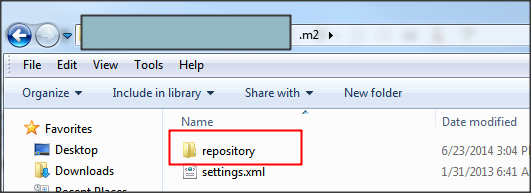
Delete the local repository settings by deleting the repository folder in .m2 (C:\Users\yourid\.m2\repository)
After restart eclipse and re-import the maven project, it is all solved.
Happy using new computer!
If you find this blog is useful, please kindly click the ads on this page to help. Thank you very much.
Oct 23, 2013
Eclipse Cannot Start "Failed to load the JNI shared library ** jvm.dll" problem
Today I downloaded the latest eclipse (R4.3.1 Kepler Service Release 1) 64bit. When I tried to start eclipse, it failed and poped up an error message
Failed to load the JNI shared library "C:\Program Files(x86)\Java\jdk1.6.0_45\bin..\jre\bin\client\jvm.dll"
It turns out that in my system environment variables, JAVA_HOME was setting to 32bit version, which makes 64bit eclipse cannot start up. Setting JAVA_HOME to 64bit version java path makes it work.
If you think this article is useful, please click the ads on this page to help. Thank you very much.
Subscribe to:
Posts (Atom)


