OneNote, without doubt is the best notebook in industry, and I have been using it since 2009. But there comes a problem that how I can sync my notes among different devices.
Microsoft gives out the solution to use OneDrive, how ever I just could not make it work.
In my OneNote, there is no place that I can switch account or use online folder etc.
When I tried to open a note file stored in OneDrive with my desktop OneNote.exe (by default it will be opened by online OneNote), I got an error like this:
The solution is to edit Registry settings.
HKEY_CURRENT_USER\Software\Microsoft\Office\15.0\Common\signin:signinoptions
Change this value from 3 to 1
Please review the link for details:
http://answers.microsoft.com/en-us/office/forum/office_2013_release-office_install/office-2013-office-account-signin-feature-disabled/d086ea41-431a-4798-b46a-2ebcd25b7cb7
The prerequisite step is to upload your OneNote notes files to OneDrive, and then login using our OneDrive account and it automatically pops up and you can choose a note you want.
Good to go!
If you find this blog is useful, please kindly click the ads on this page to help. Thank you very much.
Showing posts with label Office. Show all posts
Jun 27, 2014
Mar 27, 2012
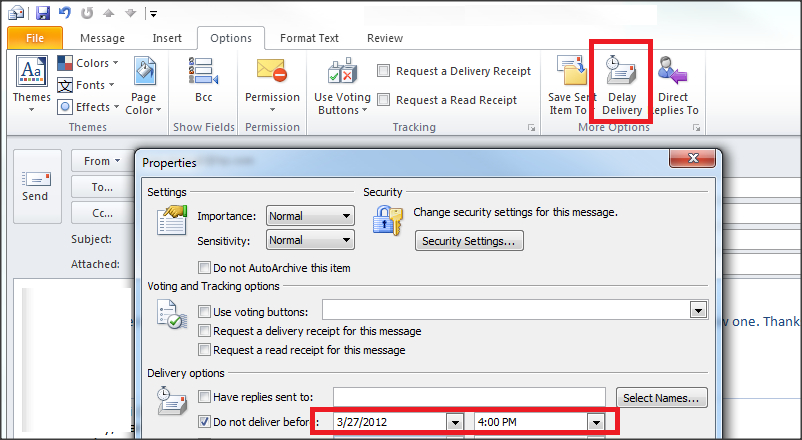
Schedule or Delay Sending an Email
I was wondering that whether Microsoft Outlook supports the feature that it can support delay sending an email, and today I know it has. It's really a good product.
Steps:
For more information about delay all emails, please refer to: http://office.microsoft.com/en-us/outlook-help/delay-or-schedule-sending-e-mail-messages-HP005242790.aspx
Steps:
- In the message, click Options.
- Click Delay Delivery, and then click the delivery date and time you want.
- If you don't want to delay the email, you can simply uncheck the checkbox.
For more information about delay all emails, please refer to: http://office.microsoft.com/en-us/outlook-help/delay-or-schedule-sending-e-mail-messages-HP005242790.aspx
Subscribe to:
Posts (Atom)