Mar 1, 2012

Chrome English Version Download Chinese Garbled Code

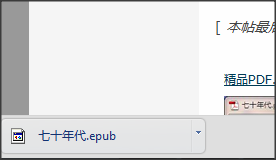
I have installed Chrome English version, and it's very smooth and easy to use. But there is a problem when downloading file with Chinese name, the name will become garbled codes. The way to solve this:
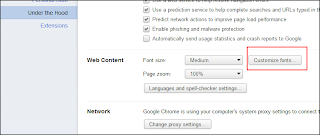
1, Chrome-->Settings-->Options-->Under the Hood; See there is an item called "Customized Font" and click it

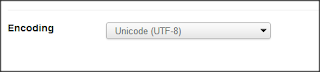
2, Change Encoding to Unicode (UTF-8)


Then everything is happy.

Feb 14, 2012

How to log in your Google Blogger


I used a new theme of Google Blogger, but found that the original login link which was on the top right was gone.

I finally found out how to log in:
1, Click your name of one post, and it will open your profile
2, Click Blogger icon on the top left.
Now you are in your blog world. Aha..

Change Putty Color

The default dark blue color for putty is so hard to see.
1, Run putty,
2.1 choose a saved session
OR
2.2 if a session is already running, right click the putty window title bar, choose "change settings...”
3, "windows“ ---> "colours" ---> "select a color to adjust" ---> choose your color to change
I chose "ANSI Blue" ---> "Modify",and changed it to LightGreen.
It's much better now!

Dec 6, 2011

VMWare NAT Setting with DHCP disabled

How to config VMware network connection is an interesting process, so I record it here:

Certainly I need to disable DHCP server service, otherwise it may send IP address out and make others not able to connect to company network.

To disable DHCP service, you can run "services.msc" in Windows and see all the services, and disable DHCP server service as shown below.


Then we need to config the network using VMware.

1, Click VMware Network Editor

2. Click NAT-->NAT Settings, get the gateway IP address. For mine, it's 192.168.136.2


3, Manually config the address of the guest OS.
For example, in Windows 7 VM, set the
IP:192.168.56.5,
Gateway: 192.168.56.2,
DNS: 192.168.56.2

Here I use Redhat 6 for example:
1) Open Network Connection

2). Config the IP, Gateway and don't forget the DNS Server


3) because our company adopts a proxy settings, we need to config the proxy settings. Please notice that:
Network Proxy under preference is for GNOME Desktop

To use browser, for example FireFox you need to config it separately.


Great! We can web surfing now!

If you find this article useful, please click the advertisement on this page to help. Thank you very much!
Oct 27, 2011

Why in Windows 7 Internet Explorer keeps asking me for credentials


I have recently installed Windows 7. As a new installed system, it runs faster than my old Windows XP which serverd me two years. But one things annoys me for a long time is that it keeps asking me for name and password.

I have figured out the solution:

in internet explorer-->Internet Options-->Security,
For Internet, Intranet, Trusted Site, click customer level and in popup dialog scroll down to the bottom, set "User Authentication", logon from "Automatic logon only in INtranet zone" to Automatic logon with current user and password.