Jun 23, 2014

Strange maven-compiler-plugin Error when importing project

This problem cost me about 3 hours and finally I found a solution.

Let me describe the background. I have got a new laptop and want to set up a development environment: for eclipse I copied from my old machine and when I wanted to import a maven project, a strange problem happened:

Now it is fixed so the screenshot below looks good, but at that time, it was saying: maven-compiler-plugin 2.5.1 missing ...

I continue with the errors, but the project crashed no matter how I add dependencies.


I have tried to re-install eclipse, install maven, use different java version, use other versions of maven-compiler-plugin... None of them worked.

Here is the ultimate solution:
Delete the local repository settings by deleting the repository folder in .m2 (C:\Users\yourid\.m2\repository)
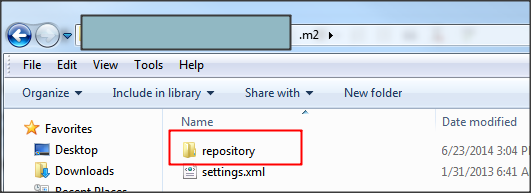

After restart eclipse and re-import the maven project, it is all solved.

Happy using new computer!

If you find this blog is useful, please kindly click the ads on this page to help. Thank you very much.

Use Apple Keyboard in Windows

I have bought an apple MB110LL/B keyboard (someone called it apple G5) and I want to use it in windows 7. I found that my function keys do not work very well.


To well use it in windows, we have a software called SharpKeys

The step is: click Add, and then click 'Type Key' button, and on the right, select the actual key you want it maps to.
Logout and login again, it will take effect.

Useful Tips:

Clear on the Numeric Keypad is the 'num lock key' in windows.

If you find this blog is useful, please kindly click the ads on this page to help. Thank you very much.

Apr 1, 2014

[Solved]Chrome cannot access Internet

All of a sudden I found my Chrome cannot access internet. In the beginning I thought it's a network problem, especially when I was in office using company proxy.

But I found that Internet Explorer is running, and even Chrome Canary is working normally.
https://www.google.com/intl/en/chrome/browser/canary.html

Chrome

I looked at all posts by didn't find any working solution.

Luckily I found out the root cause:
when I go to chrome-->Settings-->Advanced Settings
I found that change proxy settings is grayed out and it says "Your network proxy settings are being managed by an extension"


This makes me realize that there must be one extension that hijacked my network traffic. Then it is simple:
I found it's a AD blocker I am using, and I simply need to disable it.


Chrome is working well again.
For people might have similar problem, please check the extension you are using if Chrome cannot access internet, and you don't need to do things like uninstall and reinstall Chrome etc.

If you find this blog is useful, please kindly click the ads on this page to help. Thank you very much.

Mar 21, 2014

Outlook leaves a bacground task running when shut down

When writing programs, I like to turn off Outlook so I would not be distracted by new coming emails, however recently I found a problem with Outlook:
Even I closed Outlook, it is still running in a background. You can launch windows task manager and see OUTLOOK.exe process there. Yes, when there are new emails it still alert me which is a little annoying.

I searched and found out that this problem has a big chance to be caused by Outlook plugin. You can try the solution below which is from Microsoft:

1. Close Outlook and kill OUTLOOK.exe in windows task manager
·         Press the windows key+R on the keyboard to open the Run window.
·         In Run window and type outlook /safe
Note: There is a space between 'outlook' and '/'.

2. If you are able to work with Outlook without any problem then the issue might be due to add-ins. In order to disable the add-ins follow the steps given below:
·         In Outlook, click on File< Options< Add-ins.
·         Under Manage select COM Add-ins.
·         Click on GO options beside Manage, uncheck all the add-ins and click Ok. (You you can uncheck the add-ins you don't think you need most of the time)
·         Try to open Outlook and check if it works fine.

I now can have it Outlook cleanly closed. 

If you find this blog is useful, please kindly click the ads on this page to help. Thank you very much.

Feb 28, 2014

Interesting Maven - Repository setting

Today I met a maven problem that adding dependency always return a

The senario is like this:
I want to add a package called storm-kafka, and I can find one in the list

But after I clicked OK, I saw the progress bar was refreshing but very quickly it popped up an error dialog:

But interestingly another project which I download from github and was using the same library looks OK, as you can see below.

You see with the same library entry in pom.xml, this one is successful but my previous one  is not.

I spent much time on this and tried many ways like proxy setting, install an individual maven rather than using the one embedded in eclipse. But none of it works. Finally with a different eye's help, the problem was found:

in the project which successfully imported the library, in the pom.xml it has a setting like below:


Adding this in the first project's pom.xml makes it happy too.
 demo Maven Webapp
  
 http://maven.apache.org


    clojars.org
    http://clojars.org/repo


......


So this let us me learn that maven repository repository setting is an important part that you need to look at when adding dependency has some problems.

If you find this blog is useful, please kindly click the ads on this page to help. Thank you very much.