Mar 1, 2012

Visual Studio DataSet Visualizer No Data, Please use Righthand Data Visualizer

I don't know why, but sometimes, when I was debugging Visual Studio codes, I cannot click the "Magnify" icon to view DataTable contents, this is so frustrating... Very inconvenient.


I have read some posts but none of them seemed useful, but luckily, I found there is another tool developed by Miha Markic, a Microsoft MVP, which can visualize the datatable.

This is called Righthand Data Visualizer:You can download it from here:

The installation path is:
Visual Studio installation path:
\Common7\Packages\Debugger\Visualizers
For example, in Visual Studio 2010, it's C:\Program Files (x86)\Microsoft Visual Studio 10.0\Common7\Packages\Debugger\Visualizers

Don't need to restart Visual Studio, but if you are in debugging, you need to quit and debug again.

Let's see its screen:


Annoying IE warning"open a site in your trusted sites list Do you want to allow this?"

Internet Explorer will frequently popup warnings like "open a site in your trusted sites list Do you want to allow this?"


This really annoying... Let's get rid of it!

1, Go to Internet Explorer -->Internet Options,
2, Click Security Tab,
3, Click Trusted Sites (This is very important, click trusted sites)
4, Click Customer Level
5, Find an item "Websites in less privileged web content zone can navigate into this zone"
Change it from "Prompt" to "Enabled"


Enjoy!


Chrome English Version Download Chinese Garbled Code

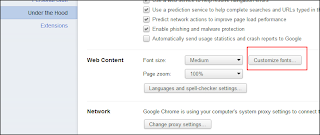
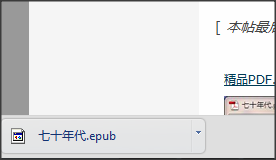
I have installed Chrome English version, and it's very smooth and easy to use. But there is a problem when downloading file with Chinese name, the name will become garbled codes. The way to solve this:
1, Chrome-->Settings-->Options-->Under the Hood; See there is an item called "Customized Font" and click it

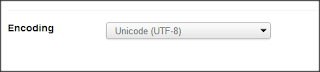
2, Change Encoding to Unicode (UTF-8)


Then everything is happy.

Feb 14, 2012

How to log in your Google Blogger


I used a new theme of Google Blogger, but found that the original login link which was on the top right was gone.

I finally found out how to log in:
1, Click your name of one post, and it will open your profile
2, Click Blogger icon on the top left.
Now you are in your blog world. Aha..

Change Putty Color

The default dark blue color for putty is so hard to see.
1, Run putty,
2.1 choose a saved session
OR
2.2 if a session is already running, right click the putty window title bar, choose "change settings...”
3, "windows“ ---> "colours" ---> "select a color to adjust" ---> choose your color to change
I chose "ANSI Blue" ---> "Modify",and changed it to LightGreen.
It's much better now!